Help Centre

Click or search below to find all the common questions asked by our members and visitors.


Questions in Golfer App


Can I access my Crazy Golf Deal and Golfer Tour purchases via the Golfer App?

11-Mar-2025 By Patrick Morgan
   

Yes, purchases associated with the email used for your Golfer App registration will be reflected in your account. These can be accessed on your main dashboard or through the 'Redeem Voucher' option in the menu section.


How do I submit a Conforming Social Score?

Published: 07-Mar-2025      Updated: 23-Dec-2025 By Patrick Morgan
   

As part of your membership, you get the ability to upload what are called ‘conforming social scores’. The steps to do this as below.

Note: under Golf Australia and World Handicapping System any rounds for handicapping need to be played with or accompanied by another player who holds an active Golf ID.

  1. Email support
  2. Open your Golfer App
  3. Select a Club to start a round (App will bring up courses closest to your location)
  4. Ensure you toggle the Handicap details and your GA Handicap and Golf ID number are correct.

    1. Toggle the "Conforming social score" button
    2. Read the notice and press "Proceed"
    3. Press the "Save" button to continue and start your round
    4. All you need to do is enter your strokes taken, the system will then automatically calculate your Stableford score. If you haven’t scored Stableford before, simply see our support article here.
    5. After your round, have your playing partner digitally sign your card and submit your round
    6. Your round will be reviewed by our Golf Concierges and uploaded within 48-72 hours of submission to your handicap record.

What is a GA Handicap?

Published: 28-Feb-2025      Updated: 24-Dec-2025
   

Under the Golf Australia (GA) Handicapping System, a GA Handicap is a single number that represents your demonstrated playing ability, regardless of the course you play.

In simple terms:

Your GA Handicap is a measure of how good a golfer you are, on average, relative to a scratch golfer.

It is the foundation number used to calculate your Daily Handicap and Playing Handicap.

What your GA Handicap represents

  • It is based on how you actually score, not how you think you should score
  • It reflects your potential ability, not your average score
  • It is course-neutral (the same number applies everywhere)
  • It updates as you submit acceptable scores

Lower number = better golfer
Higher number = higher playing allowance

How can I view my GA Handicap Record

You can access your Golf Australia handicap record on either the Golf Australia website (golf.com.au) or the Golf Australia App.

How a GA Handicap is calculated (conceptually)

Your GA Handicap is calculated using:

  • Your most recent 20 acceptable scores (or fewer if you’re new)
  • The best 8 differentials from those scores
  • Adjustments for course difficulty (Slope & Scratch Rating)
  • Daily playing conditions (if applicable)

The system averages your best performances, not your worst, to estimate your scoring potential.

This is why a GA Handicap often looks “too low” compared to what you usually shoot.

What affects your GA Handicap

It will go down when:

  • You return scores better than your current handicap
  • You play well on harder courses
  • You submit consistent low differentials

It may go up when:

  • You return poorer scores
  • Better rounds fall out of your last 20
  • Soft caps and hard caps allow movement

It will not change because:

  • A course is easy or hard
  • You play from different tees
  • You have a single bad round

What a GA Handicap is used for

Your GA Handicap is used to:

  • Compare ability between golfers
  • Calculate your Daily Handicap
  • Set competition eligibility
  • Track long-term improvement or decline

It is not the number of shots you receive on the day — that’s your Daily Handicap.

Example

  • GA Handicap: 19.2
  • This means:
    • On a “standard” course, under normal conditions,
    • Your potential score is around 19 strokes over scratch
  • On different courses, your Daily Handicap will move up or down from this number

In short

  • GA Handicap = your golfing ability
  • It is portable and course-independent
  • It’s based on your best recent performances
  • It’s the number people use to describe how good you are as a golfer

How do I start a round?

Published: 28-Feb-2025      Updated: 23-Dec-2025


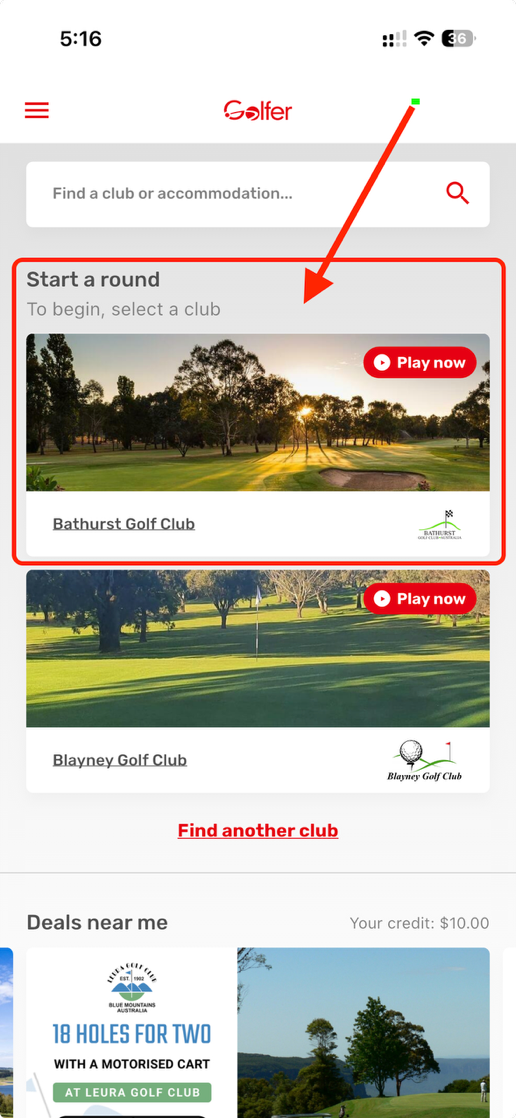
You can start a round right from the home screen of the Golfer App.

  1. Navigate to 'Start a Round.'
  2. Courses nearest to your location will appear in the home screen. 
  3. If your course appears either click "Play Now" to start a round immediately or click the course image to view course information before starting your round.
  4. If you wish to submit the score towards your handicap, you need to email support@golfer.com.au to nominate your round, prior to play. 
  5. If your club does not appear on the home screen, click "Find another club" and search for your course. 
  6. Click Play, ensure your details are correct and if happy, click save.
  7. Select your playing format, either stroke or stableford. Add any appropriate player(s), then click continue.
  8. Select the number of holes you want to play, and your starting hole and then start. 
  9. Enjoy your round and our GPS and scoring functionality.  


What is a Daily Handicap?

Published: 28-Feb-2025      Updated: 24-Dec-2025
   

Under the Golf Australia (GA) Handicapping System (which aligns with the World Handicap System – WHS), a Daily Handicap is the number of strokes you receive for a specific round on a specific course and set of tees on that day.

In simple terms:

Your GA Handicap is who you are as a golfer.
Your Daily Handicap is how many shots you get today, here, from these tees.

The key components

1. GA Handicap (your “base” handicap)

  • This is the number you see on the Golf Australia website (e.g. 19.2).
  • It reflects your demonstrated playing ability.
  • It does not change by course.

2. Daily Handicap (course-specific)

Your Daily Handicap adjusts your GA Handicap to account for:

  • The difficulty of the course (Slope Rating)
  • The par and Scratch Rating
  • The tees you are playing from
  • The gender rating applied to those tees

This ensures golfers of different abilities can compete fairly on any course.

How Daily Handicap works (conceptually)

  • Harder course = higher Daily Handicap
  • Easier course = lower Daily Handicap
  • Higher slope = more strokes allocated to higher-handicap golfers
  • Lower slope = fewer strokes allocated

The calculation is handled automatically by:

  • Golf Connect
  • Club software
  • Honour boards / scorecard apps

It's rare that players calculate this manually in practice however this option does exist. Each Club will have ‘Daily Handicap Lookup Charts’ on display where you can calculate your daily handicap prior to play. Alternatively the Golf Australia app also has a build in daily handicap calculator. This option is the most accurate as it has alive integration with the Dot Golf System.


Why Daily Handicap matters

Your Daily Handicap is the number used to:

  • Allocate strokes on the scorecard
  • Determine nett scores
  • Set competition eligibility
  • Apply maximum hole scores under WHS

It is not stored long-term — it only applies to that round, on that course, from those tees.

Example

  • GA Handicap: 19.2
  • Course: Easier par-59 course with low slope
  • Resulting Daily Handicap: 17

On that day:

  • You receive 17 strokes
  • Those strokes are allocated to the hardest holes on the scorecard
  • Your nett score = gross score – 17

In short

  • GA Handicap = your overall ability
  • Daily Handicap = your playing allowance today
  • It ensures fairness across different courses and tees
  • It’s the number that actually matters when you tee off

What is a Stableford Score?

Published: 28-Feb-2025      Updated: 24-Dec-2025
   

Stableford scoring is a popular golf scoring system that rewards good holes rather than punishing bad ones. Instead of adding up every stroke for the round, you earn points on each hole based on how you score relative to par, then total your points at the end.

How it works

  • Each hole is scored individually.
  • Your score on the hole is compared to the hole’s par.
  • You receive points depending on that result.
  • If you have a really bad hole, you can pick up once you can no longer score points — which keeps play moving.

Standard Stableford points (used in Australia under Golf Australia) Handicaps in Stableford

In most competitions (including Golf Australia events):

  • Your handicap is applied per hole.
  • On the hardest holes (based on stroke index), you receive extra strokes.
  • Your nett score on the hole (after handicap strokes) determines how many Stableford points you earn.

Example:

  • Par 4, Stroke Index 3
  • You receive 1 handicap stroke
  • You score a 4 (nett 3 = birdie)
  • You score 3 Stableford points

Winning a Stableford competition

  • Total points across all holes are added up.
  • Highest total points wins, not the lowest score.

Why golfers like Stableford

  • One bad hole doesn’t ruin your whole round
  • Encourages attacking play
  • Faster pace of play
  • More enjoyable for higher-handicap golfers

What is a Nett Score?

Published: 28-Feb-2025      Updated: 24-Dec-2025
   

In golf, your nett score is your score after your handicap has been applied. It’s the number used to fairly compare players of different abilities.

Simply put

  • Gross score = the actual number of strokes you take
  • Handicap = the number of strokes you’re allowed
  • Nett score = gross score minus handicap strokes

How it works on the course

Your handicap is converted into strokes on specific holesbased on the hole’s stroke index (see explanation further below).

  • If you receive 1 stroke on a hole, you subtract 1 stroke from your score on that hole
  • If you receive 2 strokes, you subtract 2, and so on

Example

  • You score 92 gross
  • Your course/daily handicap is 18

Nett score = 92 − 18 = 74

Using the Stroke Index Step-by-step

First, you need your daily/course handicap.

Case A: Handicap 1–18

You receive 1 stroke on holes where:

  • Stroke index ≤ your handicap

Example: Daily handicap = 12

  • You get 1 stroke on SI 1–12
  • No strokes on SI 13–18

Case B: Handicap over 18

You receive:

  • 1 stroke on every hole, plus
  • Extra strokes on the hardest holes

Example: Daily handicap = 22

  • 1 stroke on all 18 holes
  • 2nd stroke on SI 1–4


Why Nett score matters

  • Most club competitions are decided on nett score
  • It allows high- and low-handicap golfers to compete on equal terms
  • Common formats using nett scores include:
    • Stableford (nett points)
    • Par
    • Medal (nett stroke)

In short your nett score = your score after handicap strokes are applied.


How do I enter my score?

Published: 28-Feb-2025      Updated: 24-Dec-2025
   

The Golfer App allows you to digitally score golf rounds along with offering GPS functionality. To enter your scores simply follow the below steps.

  1. Open your Golfer App
  2. Select a Club to start a round (App will bring up courses closest to your location)
  3. Ensure you toggle the Handicap details and your GA Handicap and Golf ID number are correct.
  4. Press the "Save" button to continue and start your round
  5. To submit the number of strokes taken click on the star icon.


  1. Then click the edit pencil on the next screen.

  1. Then select your score and click the done button.

  1. After your round, have your playing partner digitally sign your card and submit your round.

How do I view my progressive score?

Published: 28-Feb-2025      Updated: 23-Dec-2025
   

The Golfer app offers some great functionality, particulary when tracking your score and how well you’re playing.

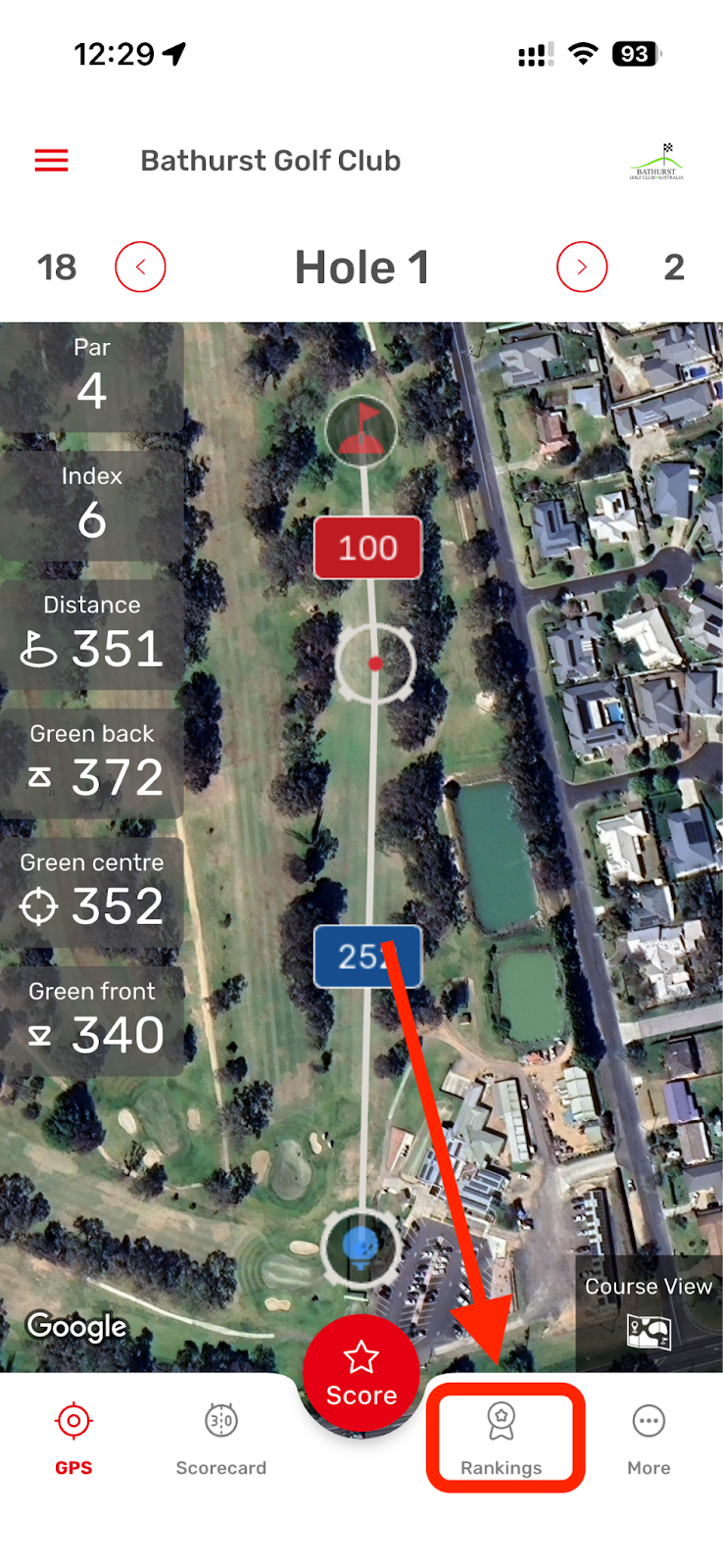
Whilst in a round (see how to start a round article) you can click "Rankings" during your round to see your total progress. 

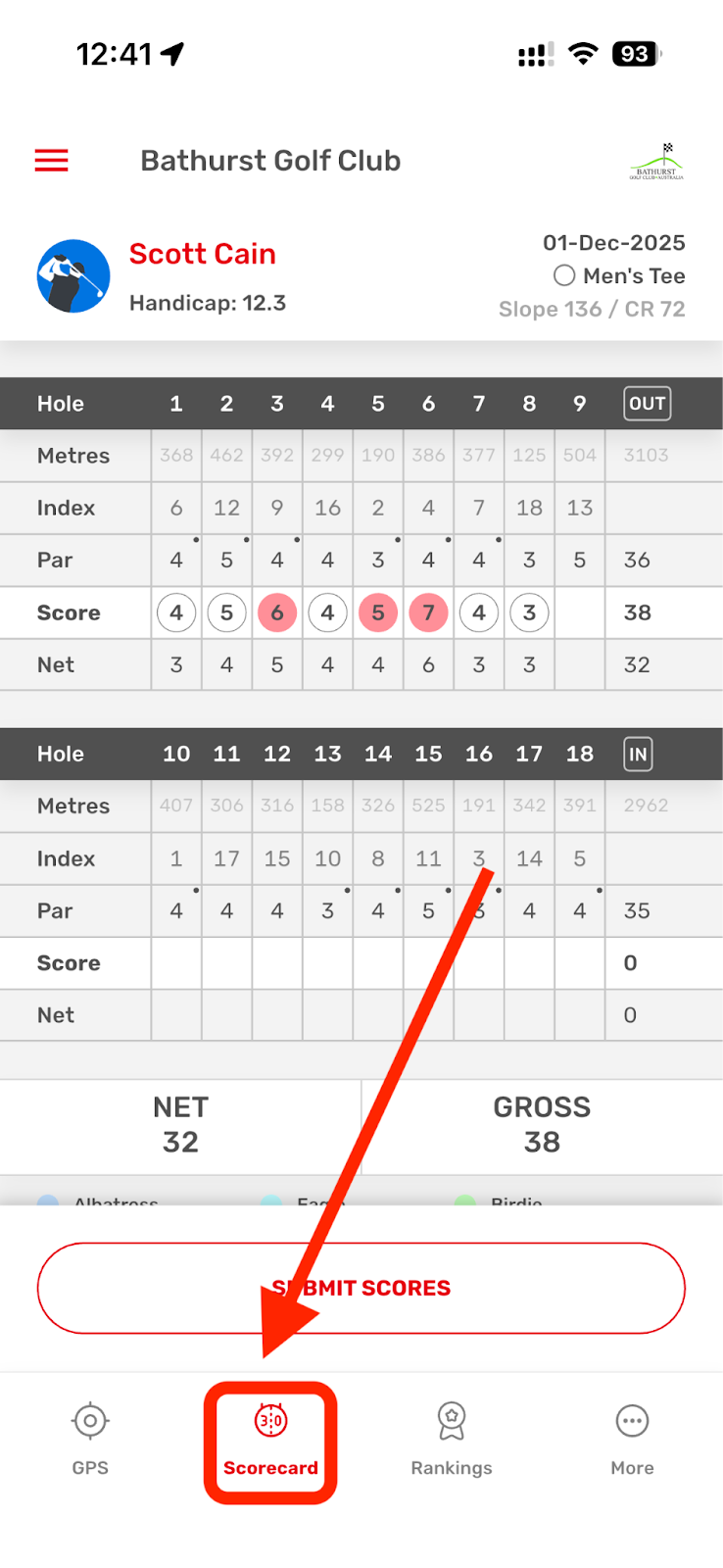
To view your hole-by-hole scores and stableford point click on the scorecard button


Can I use GPS to estimate my distance to the pin each shot?

Published: 28-Feb-2025      Updated: 23-Dec-2025
   

Yes. The GPS shows two points: Blue dot (tee shot) and Red dot (target). Adjust these points to determine shot distance and preferred club.

Our Golfer app is available in the Apple App store and Google Play store ready for download.

What are the benefits of using a GPS app when playing golf?

Using a GPS app on the course can make a noticeable difference to your game. Here’s what golfers typically experience:

 Lower Scores

Golfers who use a GPS or shot-tracking app generally improve by 2–5 shots over their first 20 rounds.

 More Accurate Club Selection

Knowing your exact distance to the front, middle and back of the green reduces distance-related mistakes by up to 30%.

 Fewer Penalty Shots

Having clear carry distances helps players avoid hazards, leading to up to 40% fewer penalty strokes.

 Better Approach and Putting Strategy

Access to green maps and approach distances can help you hit 8–12% more greens in regulation, improving your chances of two-putting.

 Faster Rounds

GPS users typically complete rounds 10–20 minutes faster, thanks to reduced time spent searching for yardage markers.

 More Consistent Results

Players using GPS data see score consistency improve by 15–25%, meaning fewer “blow-up holes” and smarter decisions.